
Event Content Workspace
Connecting participant submissions, content production, and publishing in one streamlined event workflow.
A B2B content operations workspace for event teams to collect participant information, coordinate promotional content, and keep campaigns on schedule. Designed end-to-end from product strategy and UX/UI to an AI-assisted functional prototype.
MY ROLE
Product Designer
TOOLS
Figma, Claude, Codex
Timeline
1 week, Oct 2026


01
Problem
Event teams often collect speaker and exhibitor information separately from the content workflows that depend on it. Bios, headshots, project assets, promotional graphics, and publishing schedules can become scattered across forms, spreadsheets, storage, and project management tools.

How might we connect participant submissions directly to the content production workflow they enable?
02
Product Focus
I initially explored a broader event-management workspace. Competitive analysis of Airtable, Asana, and monday.com showed that scheduling, task management, and event planning were already well-served.
Broad Event Management
Venue
Budget
Tasks
Attendees
Speakers
Content
Partners
Meetings
Broad Event Management
Participant collection
Asset readiness
Content production
Designer handoff
Rather than designing another general-purpose event planning tool, I narrowed the product to the workflow between participant onboarding and promotional content publishing.
03
Designing the IA

Instead of duplicating tasks across participant and content views, I modeled source readiness separately from production status.
04
Core Workflow
Flow A: Collect once, use downstream
Participant readiness is contextualized by downstream impact. Instead of simply showing “missing bio,” the system shows which content the missing information is blocking.
Flow B: Turning submissions into designer-ready handoff
Approved participant and event information becomes reusable source material. Organizers select what the content needs, and the workspace generates a structured handoff for the designer.
05
Designing for Operational Clarity
Content: One Model, three views

Library
Organizes content by event, session, and showcase while exposing source readiness.
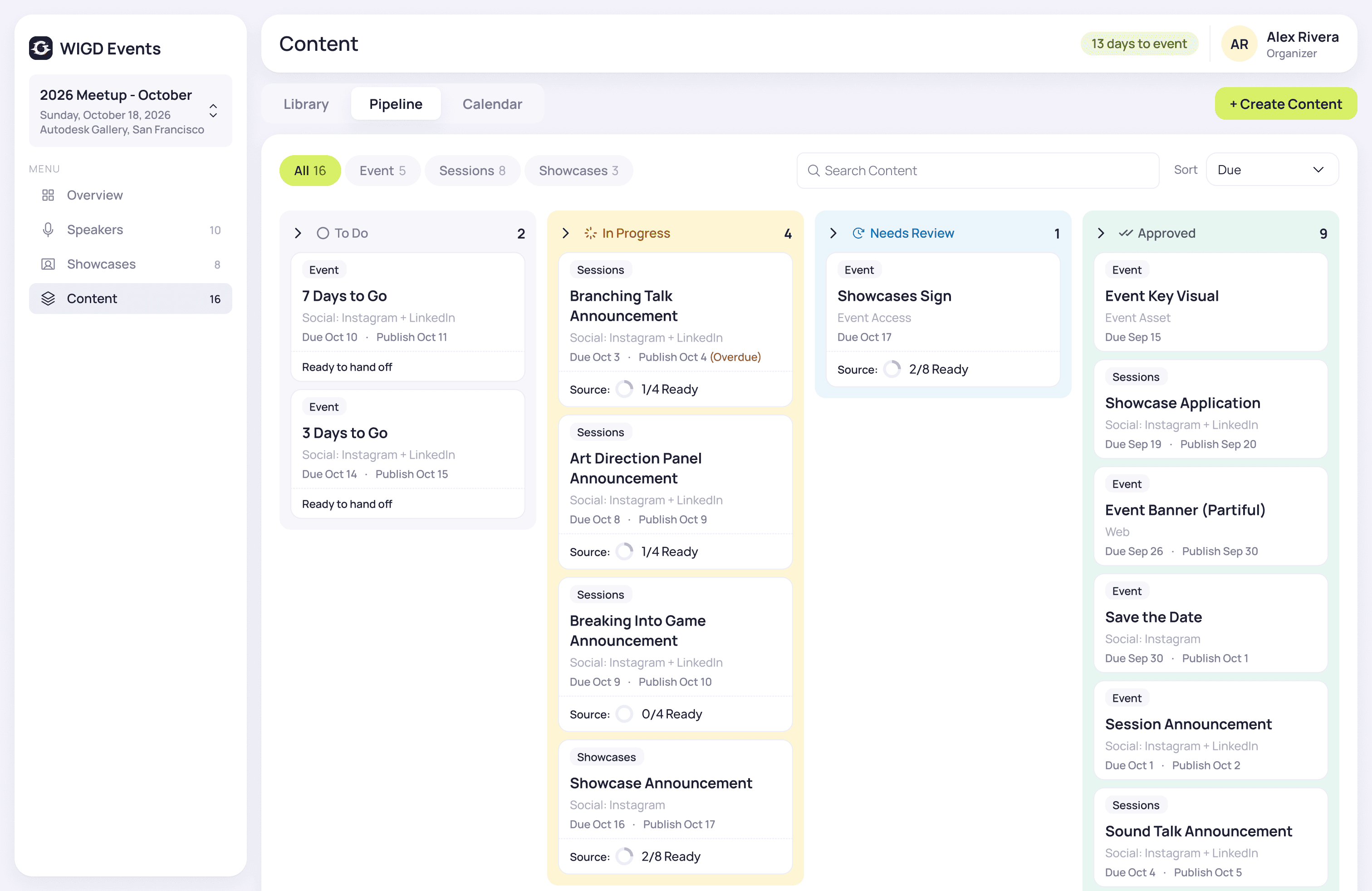
Pipeline
Tracks production from To Do → In Progress → Needs Review → Approved.
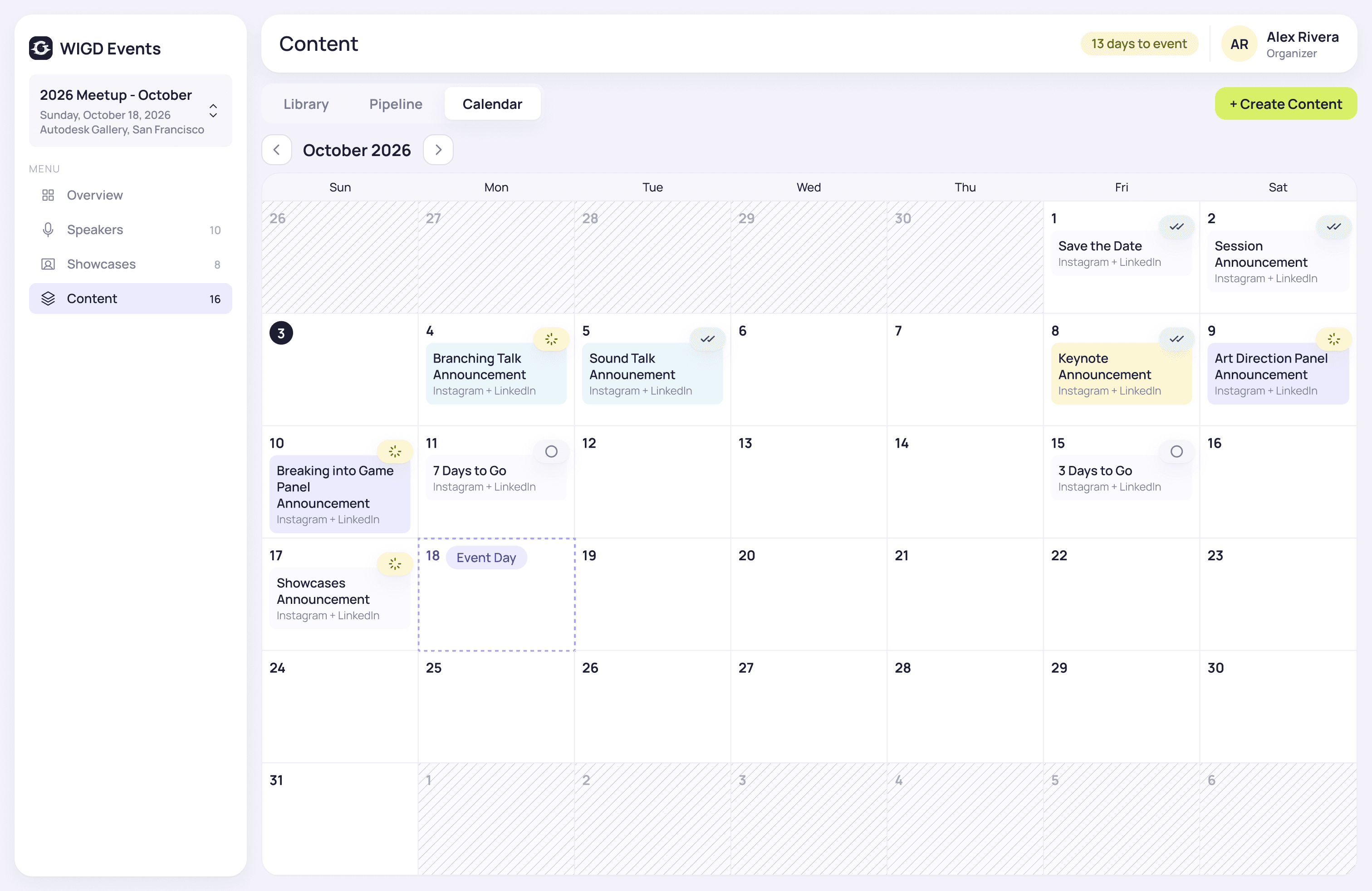
Calendar
Surfaces publishable content by publish date without mixing in non-publishing event assets.
Overview: Designing for action, not reporting

06
AI workflow + Design System

I changed AI's role throughout the process: from exploration partner, to implementation agent, to system extraction tool. Once the product and visual direction were approved, Figma became the source of truth.
07
Final Prototype
08
Reflfection
The hardest part wasn't designing individual screens, it was deciding what not to build. Narrowing a broad event-management concept into a content-operations workflow made the relationships between participant data, production status, and publishing much clearer.
AI accelerated exploration and implementation, but it also generated more patterns than the product needed. Consolidating those outputs into a deliberate system became an important part of the design work.
If I continued the project, I would validate the workflow with event organizers and designers, particularly around source readiness, handoff, and approval workflows.